Connect with your editor workflow.
Completion, hover, signature help, definition / declaration navigation, references and symbols. With Compiler enabled, clangd can also provide code actions, inlay hints, formatting and compiler diagnostics.
Read with direction, navigate with confidence and keep your workspace in view.
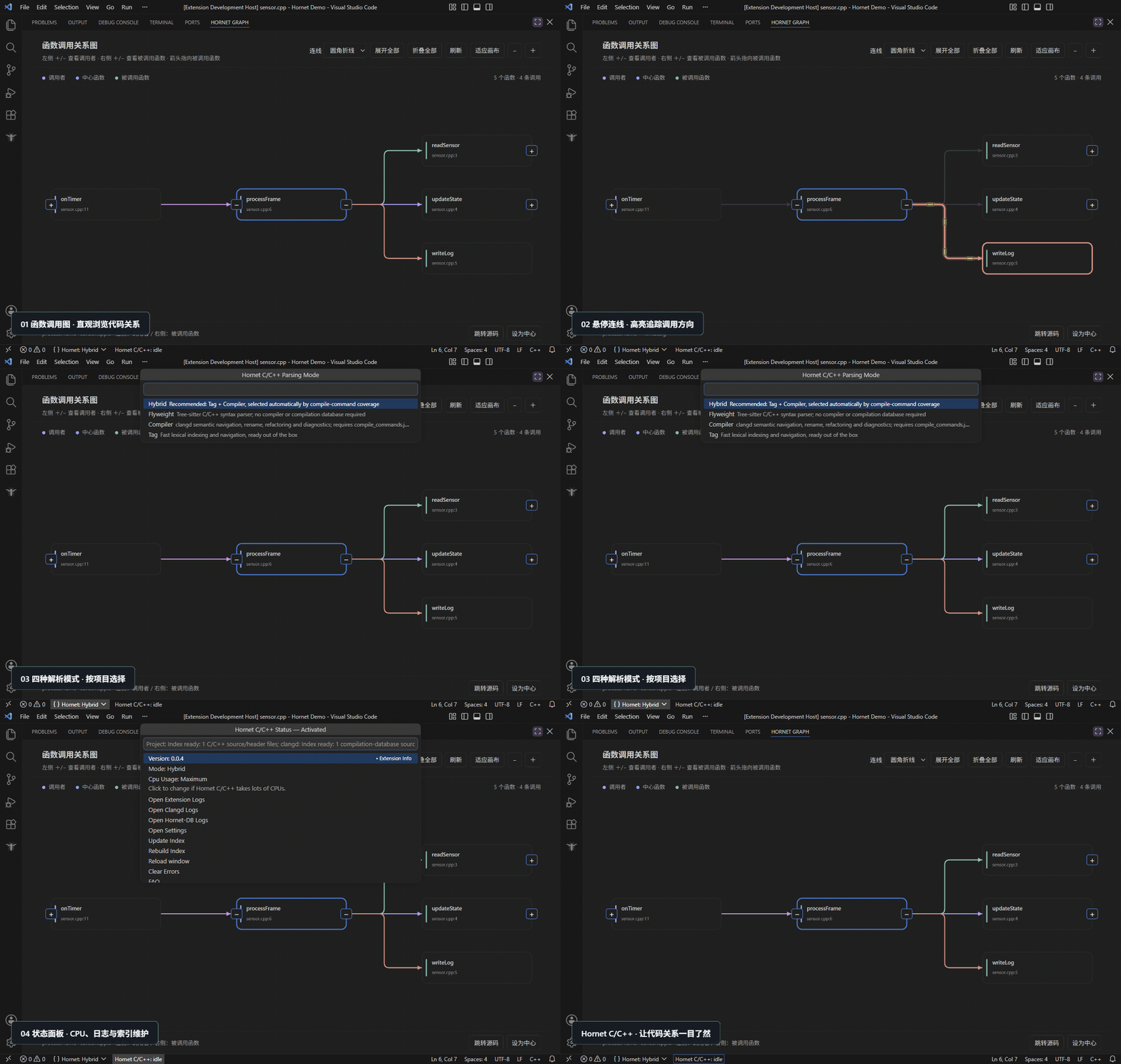
Explore calls in both directions in the Hornet Graph panel. Pan and zoom while keeping the current function anchored, or change the center to follow another path.
Each graph loads up to 250 functions; change its center to explore larger call chains. Results depend on your project's parsing configuration.
Watch call graphs, animated tracing, parsing modes and the status menu.
Press play to watch the real workflow.
This recording demonstrates the workflow. Available capabilities depend on your installed version.
Completion, hover, signature help, definition / declaration navigation, references and symbols. With Compiler enabled, clangd can also provide code actions, inlay hints, formatting and compiler diagnostics.
Recursively scans sources and headers, including generated and third-party folders, by default. Explicit Hornet exclusions define the boundaries. Progress appears as a percentage and file count.
Adjust CPU settings, update or rebuild indexes, and open extension, Clangd and Hornet-DB logs from the status bar. Each local workspace keeps its own configuration and language services.
Stay in VS Code and bring it into your familiar workflow.